3D Cooking Elements Bundle: A Practical Guide to Elevating Your Digital Food Content
In the fast-paced world of digital content creation, visual appeal is often the deciding factor between a scroll-past and a click. Whether you are designing a mobile application for meal planning, crafting social media graphics for a restaurant, or laying out a modern recipe e-book, static images often fall flat. This is where the 3D Cooking Elements Bundle becomes an invaluable resource. It offers a collection of high-quality, vibrant assets that bring a playful yet professional touch to culinary projects. However, simply downloading these files is not enough; understanding how to integrate them effectively is crucial for maximizing their potential.
Understanding the Value of 3D Assets in Culinary Design
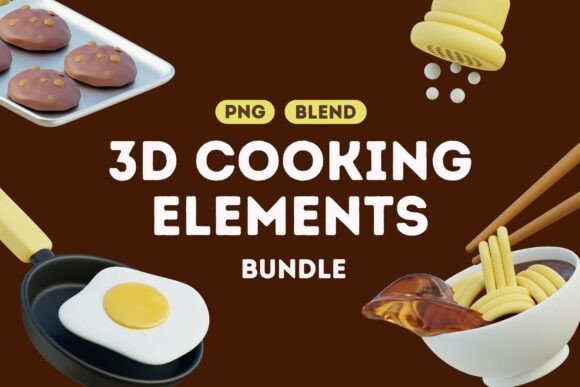
The shift toward three-dimensional graphics in food marketing is not just a trend; it is a response to consumer demand for engaging, tactile visuals. Unlike traditional photography, which can be limited by lighting conditions and perishability, 3D models offer consistency and flexibility. The 3D Cooking Elements Bundle provides designers with ready-to-use kitchen tools, delicious food items, and chef essentials. These assets are designed to be fun and vibrant, making them ideal for brands that want to appear approachable and modern.
For beginners, the allure of pre-made assets is obvious: speed and ease. For professionals, the value lies in the quality of the renders and the versatility of the file formats. With both PNG and BLEND files included, this bundle caters to a wide range of technical skill levels. Yet, many creators overlook the strategic importance of choosing the right format for their specific workflow, leading to unnecessary bottlenecks.
Common Mistakes When Using Pre-Made 3D Food Assets
While having access to high-quality assets is a significant advantage, misuse can undermine the professionalism of your final output. Here are some common pitfalls creators encounter and how to avoid them.
Ignoring File Format Capabilities
One of the most frequent errors is treating all files within the bundle as equal. The package includes 20 PNG files with transparent backgrounds and 2 BLEND files. Many users default to the PNGs because they are easier to drag and drop into design software like Canva or Photoshop. While this is efficient for simple overlays, it limits your creative control. You cannot change the lighting, angle, or color of a PNG.
Better Approach: If you have access to Blender or similar 3D software, utilize the BLEND files. These allow you to adjust the camera angle to match your composition’s perspective, tweak lighting to ensure shadows align with other elements in your scene, and even modify textures. This level of customization ensures your 3D elements look integrated rather than pasted on.
Mismatched Lighting and Shadows
Even when using PNGs, a common mistake is ignoring the direction of light. If your background image has light coming from the top left, but your 3D avocado cast a shadow to the right, the brain immediately registers the image as "fake" or low-effort. This disconnect reduces trust in the brand or content creator.
Better Approach: Always analyze the light source in your base image before placing your 3D cooking elements. If the lighting does not match, consider using the BLEND files to re-render the asset with correct shadow directions, or use editing software to manually adjust the opacity and blur of the shadow layer to create a more natural blend.
Overcrowding the Composition
The vibrant nature of the 3D Cooking Elements Bundle can tempt designers to use every asset available. Cluttering a design with too many floating utensils, ingredients, and chef hats creates visual noise. This overwhelms the viewer and obscures the primary message or call to action.
Better Approach: Practice restraint. Use 3D elements as accents to guide the eye, not as the main focus unless the product itself is the hero. For example, if you are promoting a cooking app, use a single, well-placed 3D whisk or ingredient to frame the text, rather than surrounding the screen with a chaotic array of kitchen tools. White space is essential for maintaining a modern, clean aesthetic.
Maximizing Efficiency and Quality
To get the most out of your purchase, consider the context in which these assets will be used. For social media content, speed is often critical. In this case, the PNG files are perfect for quick turnaround posts. However, for high-stakes projects like app interfaces or printed materials, investing time in the BLEND files pays off in higher resolution and better integration.
Another overlooked detail is scalability. PNGs are raster images, meaning they can lose quality if scaled up significantly. Always check the resolution of the PNG files provided. If you need to use an element in a large format, such as a banner or print ad, ensure the original dimensions are sufficient. If not, return to the BLEND file to render a higher-resolution version specifically for that use case.
What to Check Before Integrating Assets
Before finalizing any project, perform a quick quality audit. Look at the edges of the PNG files. Are there any jagged pixels or leftover background artifacts? Clean edges are vital for a professional look. Additionally, ensure color consistency. The vibrant colors of the 3D models should complement your brand palette. If they clash, consider adjusting the hue or saturation slightly to harmonize with your overall design scheme.
For those using the BLEND files, check the polygon count and texture resolution if you plan to import them into real-time engines or web-based 3D viewers. Optimizing these assets ensures faster load times and smoother performance, which is crucial for user experience in digital products.
Final Thoughts on Creative Application
The 3D Cooking Elements Bundle is more than just a collection of images; it is a toolkit for enhancing storytelling. By avoiding common mistakes like mismatched lighting and overcrowding, and by leveraging the full potential of both PNG and BLEND formats, you can create content that stands out. Whether you are a freelancer looking to impress clients or a small business owner aiming to boost engagement, these assets provide a solid foundation for creative excellence. Remember, the goal is not just to add decoration, but to enhance communication and evoke appetite and interest through thoughtful, high-quality design.