Integrating the 3D Home Furniture Pack into Modern Design Workflows
In the fast-paced world of digital content creation, efficiency is not just a luxury; it is a necessity. Whether you are a freelance graphic designer working on tight deadlines, a social media manager curating lifestyle branding, or an interior architect presenting initial concepts to clients, the assets you choose define both your speed and your aesthetic quality. This is where specialized asset libraries become critical components of a professional toolkit. The 3D Home Furniture Pack represents a strategic resource for creators who need to balance visual appeal with practical workflow integration. By offering a curated selection of essential furniture pieces rendered in a cheerful, modern 3D style, this collection allows designers to bypass the time-consuming process of modeling from scratch while maintaining a high standard of visual consistency.
Understanding the Asset Structure and Compatibility
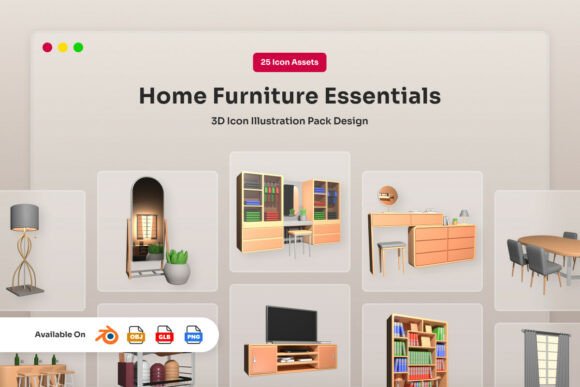
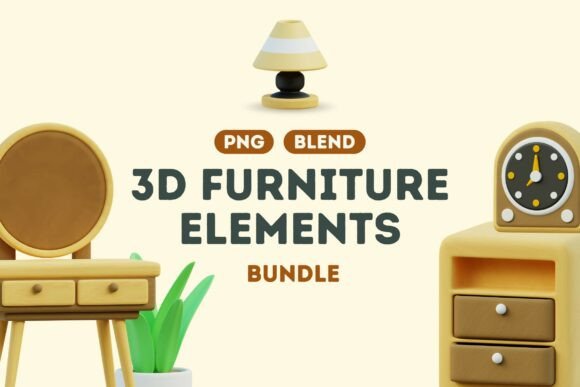
Before integrating any new resource into your pipeline, it is vital to understand its technical composition. The 3D Home Furniture Pack is designed with versatility in mind, catering to users with varying levels of technical expertise and software preferences. The package includes two primary file formats: twenty PNG files with transparent backgrounds and two BLEND files. This dual-format approach ensures that the assets are accessible to a broad spectrum of professionals, from 2D graphic designers to 3D artists.
The PNG files are particularly valuable for quick implementation. With transparent backgrounds, these images can be dragged and dropped directly into Photoshop, Canva, Figma, or any other raster-based design tool. This eliminates the need for complex masking or background removal processes, which often degrade image quality. For those working within 3D environments, the included BLEND files provide the source data. These files allow for deeper customization, enabling users to adjust lighting, materials, and camera angles to match specific project requirements. Understanding this structure helps you plan your workflow more effectively, deciding early on whether you need static imagery or dynamic 3D models.
Streamlining the Conceptualization Phase
One of the most challenging aspects of any design project is the initial conceptualization phase. Clients and stakeholders often struggle to visualize abstract ideas, leading to prolonged feedback loops and revisions. Incorporating the 3D Home Furniture Pack at this early stage can significantly accelerate approval processes. Instead of presenting wireframes or text descriptions, you can create mood boards and preliminary layouts using these pre-rendered assets.
For example, if you are developing a brand identity for a home decor startup, you can quickly assemble scenes featuring the classic armchairs, soft beds, and stylish desks included in the pack. These elements bring warmth and personality to your presentations, helping clients connect emotionally with the concept. Because the style is consistent across all twenty pieces, your mockups will look cohesive and professional, even in the earliest stages of development. This reduces the cognitive load on your audience and allows them to focus on the strategic aspects of the design rather than getting distracted by inconsistent visual elements.
Enhancing Social Media and Content Marketing
Content creators and marketers face the constant pressure to produce fresh, engaging visuals for social media platforms. Static product shots can often feel sterile, while full 3D renders require significant rendering time and computational power. The 3D Home Furniture Pack offers a middle ground that optimizes both quality and speed. The cheerful and modern aesthetic of the collection aligns well with current trends in lifestyle branding, which favor approachable, bright, and clean visuals.
You can use the decorative lamps, plants, and mirrors to add depth and context to promotional graphics. For instance, when creating a post about productivity tips, placing a stylish desk from the pack alongside your text overlay creates an immediate visual association with work and organization. Similarly, for wellness-related content, the soft beds and comfortable armchairs can evoke feelings of relaxation and self-care. By having these assets readily available, you can reduce the time spent searching for stock photos that may not quite fit your brand’s color palette or style. This consistency strengthens brand recognition and allows for faster content production cycles.
Technical Integration and Workflow Optimization
To maximize the utility of the 3D Home Furniture Pack, it is important to establish an organized system for asset management. Simply downloading the files is not enough; integrating them into your daily routine requires preparation. Start by creating a dedicated folder in your cloud storage or local drive specifically for this pack. Within this folder, categorize the PNG files by type—such as seating, sleeping, lighting, and decor. This simple organizational step saves valuable time when you are in the flow of creation and need to locate a specific item quickly.
For users working with the BLEND files, consider setting up a master scene file where all the furniture pieces are imported and properly scaled. This allows you to test different lighting setups and camera angles in advance. Once you have established a few preferred lighting presets, you can save them as templates. When a new project arises, you can duplicate the template, swap in the necessary furniture items, and render the scene with minimal effort. This method ensures consistency across multiple projects and reduces the technical friction associated with 3D rendering.
Quality Control and Consistency
Maintaining visual consistency is crucial for professional credibility. When mixing assets from different sources, discrepancies in lighting, shadow direction, and resolution can make a design look amateurish. Since all items in the 3D Home Furniture Pack are created with the same artistic vision and technical parameters, they naturally harmonize with one another. However, when combining these assets with other elements, such as photography or vector graphics, pay close attention to lighting directions. Ensure that the shadows in your PNG files align with the light sources in your overall composition. If necessary, use blending modes in your design software to integrate the shadows seamlessly.
Long-Term Value and Scalability
Investing in a high-quality asset pack like this is not just about solving immediate design needs; it is about building a scalable resource library. As your business or creative practice grows, the demand for content will increase. Having a reliable set of versatile furniture models allows you to scale your output without proportionally increasing your workload. You can reuse these assets across different campaigns, adjusting colors or contexts to keep them feeling fresh. Furthermore, the timeless nature of the modern 3D style ensures that these assets will remain relevant for years, providing a strong return on investment.
For educators and trainers, these assets can also serve as excellent teaching tools. They provide clear, visually appealing examples for lessons on interior design principles, spatial awareness, and digital composition. Students can experiment with arrangement and color theory without the barrier of needing advanced 3D modeling skills, allowing them to focus on foundational design concepts.
Practical Implementation Tips
To get the most out of your purchase, consider the following practical steps:
- Audit Your Current Library: Before importing the new files, review your existing assets to identify gaps. Determine which pieces from the 3D Home Furniture Pack will complement your current resources and which will replace lower-quality alternatives.
- Create Presets: If you use the BLEND files, create a library of material presets. This allows you to quickly change the fabric or wood finish of the furniture to match different client brands.
- Test Resolution Limits: Examine the PNG files at various sizes to understand their resolution limits. This knowledge will help you decide when to use the 2D images versus when to render new images from the 3D models for larger formats.
- Document Usage Rights: Keep a record of the license terms associated with the pack. Understanding where and how you can use these assets commercially ensures that you remain compliant and protects your business from legal issues.
In conclusion, the 3D Home Furniture Pack is more than just a collection of images; it is a workflow enhancer that supports creativity, efficiency, and professionalism. By understanding its structure, integrating it thoughtfully into your design process, and maintaining strict quality control, you can elevate your digital projects and deliver superior results to your clients and audience. Whether you are designing a website, crafting a social media campaign, or planning an interior layout, this pack provides the essential building blocks for success.