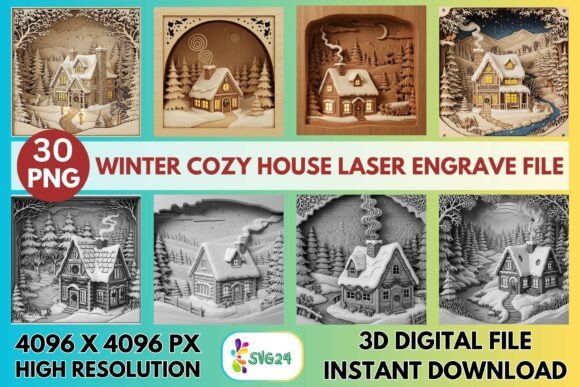
3D Winter Cozy House Laser Engrave File
Winter brings a unique opportunity for creators to capture the warmth of the season through tactile, handcrafted items. The 3D Winter Cozy House Laser Engrave File is designed specifically to meet this demand, offering a high-fidelity digital asset that translates seamlessly from screen to physical material. Unlike standard vector outlines, this bundle utilizes grayscale shading to create depth, texture, and a sense of three-dimensionality on flat surfaces. For laser machine owners ranging from hobbyists using desktop units to professionals running industrial CO₂ systems, this file set provides the precision needed to produce gallery-worthy results without hours of manual editing.
Understanding the Power of Grayscale Engraving
The core value of the 3D Winter Cozy House Laser Engrave File lies in its use of 4096×4096 pixel resolution grayscale PNGs. In laser engraving, grayscale is not merely black and white; it is a language of power and speed. Each shade of gray corresponds to a specific dwell time or power setting, allowing the laser to burn deeper into the material where the image is darker and skim the surface where it is lighter. This technique creates the illusion of shadows and highlights, transforming a simple illustration of a cottage into a scene with visible snowdrifts, glowing windows, and textured brickwork.
This approach is particularly effective for winter themes because the subject matter naturally relies on contrast. The stark difference between a dark, cozy home interior and the bright, snowy exterior is perfectly captured through dithering algorithms like Jarvis or Stucki, which are compatible with the provided files. By leveraging these high-resolution images, creators can avoid the jagged edges and banding often seen in lower-quality downloads, ensuring that every intricate detail remains crisp even when scaled up for large signage or down for delicate jewelry boxes.
Creative Applications Across Materials
The versatility of this design bundle extends far beyond a single medium. Because the files are optimized for various laser machines, including Glowforge, LightBurn, xTool, and Sculpfun, they adapt well to different substrates. Here is how different materials can transform the same design:
- Light Wood: Birch plywood and maple are ideal for capturing the full range of grayscale tones. The natural grain adds an organic texture that complements the rustic aesthetic of a winter house. With the recommended settings—such as a speed of 1000 and power of 90 on Glowforge—the result is a warm, earthy piece perfect for wall art.
- Paper and Cardstock: For stationery enthusiasts, these files work beautifully on heavy cardstock to create luxury holiday cards or custom book covers. The fine detail allows for intricate borders and textural backgrounds that feel premium.
- Textiles and Leather: While requiring adjusted power settings to prevent burning through, the design translates well onto leather journals or canvas tote bags. The "cozy" theme pairs exceptionally well with leather goods, creating a sophisticated gift option.
- Tableware and Packaging: Imagine etching this scene onto glass coasters or wooden serving trays. It also serves as an excellent stamp design for packaging small artisanal goods, adding a touch of seasonal branding to soaps, candles, or baked treats.
Project Ideas for Entrepreneurs and Hobbyists
For small business owners looking to expand their holiday catalog, the 3D Winter Cozy House Laser Engrave File offers a scalable product line. Consider creating a series of nesting dolls (Matryoshka) where each layer reveals a different part of the winter scene. Alternatively, craft personalized photo frames where the engraved house acts as a decorative border, leaving the center open for a family photograph. The inclusion of 15 coloring PNG files alongside the grayscale versions opens another revenue stream: printable activity sheets for children or adult coloring books that feature the same artistic style.
Hobbyists can take a more experimental approach. Use the files to create mixed-media art by combining laser-engraved wood pieces with acrylic paint or resin. The deep burns of the grayscale file provide a perfect base for painting over, allowing you to highlight the windows with gold leaf or add a glossy resin roof to simulate ice. These projects demonstrate how a single digital asset can be interpreted in multiple ways, encouraging users to push the boundaries of their creative process.
Optimizing Your Workflow for Professional Results
To achieve the best possible outcome, understanding your machine's capabilities is crucial. The bundle includes specific recommendations for popular devices, but experimentation is key. For those using Glowforge, the suggested settings of Max LPI at 270 ensure that the dither pattern is dense enough to look smooth to the naked eye. If you find the image too light, increasing the LPI slightly can deepen the blacks without sacrificing detail. Conversely, if you are working with LightBurn, applying the Jarvis dither filter to the grayscale PNG will optimize the dot pattern for maximum clarity on wood.
Consistency is vital for commercial success. Since the files are non-editable PNGs, resizing must be done carefully. Always maintain the aspect ratio to prevent distortion of the house structure. When scaling, remember that while the resolution is high, there is a limit to how much you can enlarge the image before pixelation becomes visible. For large format prints, consider tiling the image or adjusting the LPI to accommodate the larger surface area. Additionally, always run a test cut on scrap material of the same type you intend to use. Variations in wood density or paper weight can significantly alter the final appearance of the engrave.
Building a Cohesive Brand Identity
For marketers and designers, consistency in visual identity is paramount. The 3D Winter Cozy House Laser Engrave File provides a cohesive aesthetic that can anchor a seasonal brand campaign. Whether you are selling physical products or digital prints, the recurring motif of the cozy winter home creates a recognizable signature. You can pair this design with complementary typography and color palettes to create a unified look across social media, packaging, and in-store displays.
The emotional resonance of the design is its strongest asset. In a market saturated with generic holiday clips, a detailed, hand-crafted look stands out. It signals quality, care, and attention to detail—values that resonate deeply with consumers aged 20–50 who prioritize authenticity. By utilizing this file set, you are not just selling a product; you are offering a piece of art that evokes feelings of home, comfort, and nostalgia.
Final Thoughts on Creative Execution
The 3D Winter Cozy House Laser Engrave File is more than just a download; it is a tool for expression. Its high resolution, optimized settings, and versatile applications make it suitable for a wide range of projects, from quick weekend crafts to professional product lines. By mastering the interplay between light, shadow, and material, you can unlock new dimensions in your laser engraving work. Remember that while the file provides the foundation, your creativity determines the final masterpiece. Experiment with different woods, adjust your dithering strategies, and let the spirit of the season guide your next project.