3D Light House Laser Engrave File: A Practical Review for Makers
In the realm of digital crafting, the quality of your source file often dictates the ceiling of your final product. The 3D Light House Laser Engrave File represents a specific niche within the coastal and nautical design market, offering creators a high-resolution asset designed to bridge the gap between simple vector outlines and complex, shaded imagery. For professionals and hobbyists alike who utilize CO₂ laser machines, this file set provides a structured approach to creating depth on materials like wood, leather, and acrylic without requiring extensive manual editing in vector software.
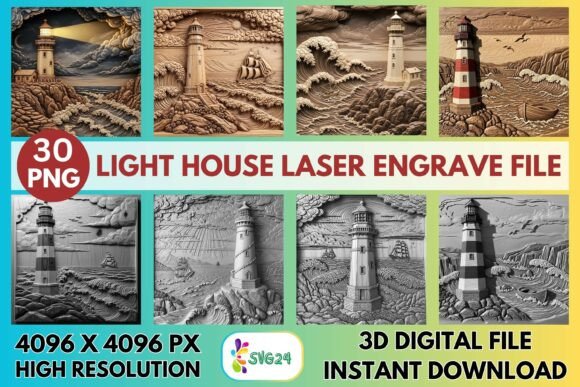
The core value of this resource lies in its preparation. Unlike standard line-art SVGs that require the user to manually add hatching or shading to simulate three-dimensionality, this grayscale PNG set is pre-optimized for dithering algorithms. This distinction is crucial for makers looking to streamline their workflow while maintaining professional-grade output. By leveraging a 4096×4096 pixel resolution, the file ensures that intricate details—such as the brickwork of the lighthouse structure, the texture of surrounding rocks, and the atmospheric elements of the sea—are preserved during the engraving process.
Technical Specifications and File Integrity
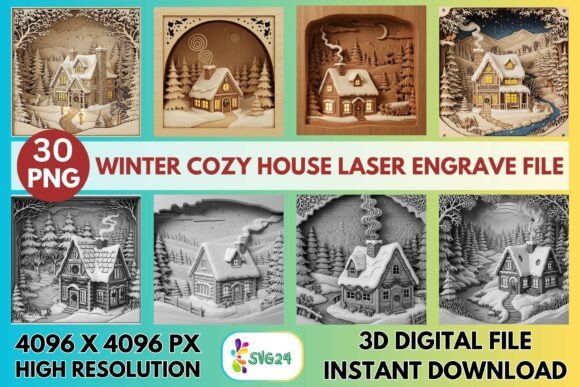
When evaluating digital assets for laser engraving, resolution and format are the primary indicators of reliability. The 3D Light House Laser Engrave File delivers a comprehensive package consisting of 15 coloring PNG files and 15 grayscale PNG files, all at a maximum resolution of 4096×4096 pixels. This dimension is significant because it allows for substantial scaling without the introduction of pixelation or artifacting, which can ruin the crispness of an engrave on large signage or wall art.
The inclusion of both colored and grayscale versions offers flexibility in how the design is interpreted by different laser drivers. Grayscale images are essential for variable power engraving, where the laser adjusts its intensity based on the brightness of each pixel. Darker areas receive more power, creating deeper burns, while lighter areas receive less, resulting in a gradient effect that mimics true 3D shading. The transparent backgrounds included in these files further simplify the layout process, allowing users to place the lighthouse design directly onto irregular shapes or combine it with other text and graphics without needing to mask out white space.
It is important to note a specific limitation mentioned in the documentation: the files are non-editable regarding resizing logic. While the high resolution supports scaling, the buyer assumes responsibility for ensuring the dimensions fit their specific project constraints. This is a standard practice for raster-based laser files, but it requires the user to have a basic understanding of aspect ratios and DPI settings in their cutting software to avoid distortion.
Performance Across Major Laser Platforms
A critical factor in the utility of any digital design file is its compatibility with industry-standard hardware. The 3D Light House Laser Engrave File has been optimized for a wide range of CO₂ laser systems, including Glowforge, LightBurn, xTool, Sculpfun, and OMTech. However, "optimization" does not mean a one-size-fits-all solution; rather, it implies that the file structure supports the specific dithering engines used by these platforms.
For Glowforge users, the recommended settings suggest a speed of 1000 mm/min with a power setting of 90% in Grayscale mode. Utilizing the "Vary Power" feature is essential here, as it translates the grayscale data into variable energy output. With a Line Per Inch (LPI) setting of 270 and a single pass, the machine can achieve fine detail without charring the material excessively. This setup works particularly well on light-colored woods, such as birch plywood or maple, where the contrast between the natural grain and the engraved lines is most visible.
Users operating LightBurn will find the Jarvis dither algorithm to be the most effective method for rendering this file. Jarvis dithering distributes error across a wider area, resulting in smoother gradients compared to Floyd-Steinberg or Stucki algorithms, which can sometimes introduce banding in subtle transitions. The recommendation to use the grayscale PNG version in LightBurn aligns with best practices for achieving photorealistic depth. Experienced makers know that the choice of dither pattern can alter the perceived texture of the final piece, making this guidance valuable for consistent results.
Material Compatibility and Real-World Applications
The versatility of the 3D Light House Laser Engrave File extends beyond the software into the physical materials used for production. While the design is technically capable of being engraved on almost any surface that reacts to CO₂ lasers, certain substrates yield superior aesthetic results. Light-colored hardwoods remain the top recommendation due to their ability to hold fine detail and provide natural contrast. When engraved on walnut or cherry, the darker background may reduce the visibility of the lighter gray tones in the image, potentially flattening the 3D effect unless the power settings are significantly adjusted.
Beyond wood, this file performs admirably on leather and acrylic. On leather, the engraving creates a permanent, tactile impression suitable for high-end coasters, journal covers, or decorative plaques. Acrylic, particularly frosted or black varieties, offers a modern interpretation of the coastal theme, ideal for contemporary home décor or business signage. Textiles and paper are also viable options, though they require careful calibration to prevent burning through the material.
Practical applications for this design are extensive. Small business owners can utilize the file to create branded merchandise, such as beach-themed ornaments, personalized gifts, or custom wall art for boutique hotels and cafes. The nautical elegance of the lighthouse motif appeals to a broad demographic, making it a reliable choice for inventory diversification. For educators and workshop leaders, the file serves as an excellent teaching tool for demonstrating grayscale engraving techniques, dithering concepts, and material testing.
Evaluating Long-Term Value and Workflow Integration
From a business perspective, investing in high-quality, pre-optimized files like the 3D Light House Laser Engrave File reduces the time spent on design iteration. Instead of spending hours creating a complex shading map from scratch, a maker can import the file, adjust the size, and begin production immediately. This efficiency translates directly into higher throughput and lower labor costs per unit.
However, the long-term value depends on the creator's ability to adapt the file to evolving trends. Since the files are static raster images, they cannot be easily modified to change the color palette or structural elements of the lighthouse itself. If a client requests a specific alteration to the scene, such as adding a boat or changing the sky, the maker would need to composite the image in external software like Photoshop before importing it back into the laser driver. This limitation is acceptable for most standard projects but may require additional skill sets for highly customized commissions.
Consistency is another key strength. Because the file is standardized at 4096×4096 pixels, every batch produced will maintain uniform detail levels, provided the machine settings remain constant. This reliability is essential for entrepreneurs building a brand reputation on quality craftsmanship. Whether producing a single custom gift or a run of fifty holiday ornaments, the output remains predictable and professional.
Who Benefits Most From This Resource?
The 3D Light House Laser Engrave File is particularly well-suited for several distinct groups. First, serious hobbyists who have moved beyond basic cut-and-etch projects and are seeking to master grayscale engraving will find the included settings and high-resolution assets invaluable. Second, small business owners in the craft sector who need to expand their catalog with seasonal or thematic items can deploy this design quickly to capture market demand.
Additionally, marketers and content creators who document their making processes on social media or blogs will appreciate the visual impact of the finished pieces. The depth and clarity of the engrave make for compelling photography, which is essential for driving engagement and sales online. Finally, educators teaching digital fabrication can use this file to illustrate the differences between vector and raster workflows, providing students with a tangible example of how digital data translates into physical texture.
Ultimately, the decision to use this file should hinge on the specific needs of the project. If the goal is to produce a quick, clean, and visually striking nautical piece with minimal setup time, this resource offers a robust solution. It balances technical precision with artistic appeal, serving as a reliable foundation for both experimental learning and commercial production. By understanding its strengths and limitations, makers can integrate the 3D Light House Laser Engrave File effectively into their creative toolkit, ensuring that their coastal-themed projects stand out in a crowded marketplace.