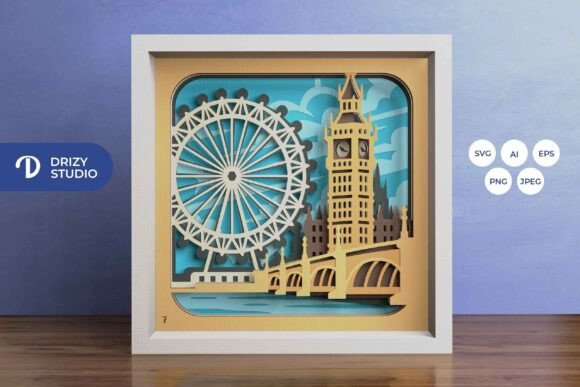
London England 3D Layered Paper Cut: A Guide to Creating Stunning Shadow Boxes
There is a unique charm in transforming flat paper into a scene that appears to have depth, distance, and atmosphere. The London England 3D Layered Paper Cut captures this magic perfectly, offering a digital template that brings iconic landmarks like Big Ben and the London Eye to life through intricate layering. Whether you are a seasoned crafter or someone looking for a meaningful DIY project, this design offers a tangible way to celebrate one of the world's most beloved cities. However, creating a professional-looking shadow box requires more than just downloading a file; it demands an understanding of how digital assets translate into physical reality.
Understanding the Value of Digital Templates
The appeal of the London England 3D Layered Paper Cut lies in its versatility. Unlike pre-made decorations found in stores, this digital product allows you to control every aspect of the final piece. You receive the design in multiple formats, including AI, EPS, PNG, SVG, and JPEG. This variety ensures compatibility with almost any workflow, from high-end graphic design software to consumer-grade cutting machines like Cricut or Silhouette. The inclusion of an SVG file is particularly valuable, as it allows for vector-based resizing without losing quality, provided you maintain the correct aspect ratio.
Many beginners overlook the significance of having these specific file types. Relying solely on a low-resolution JPEG might seem convenient, but it often leads to jagged edges when printed or cut. By utilizing the vector formats (SVG, AI, EPS), you ensure that the lines remain crisp, which is essential for the delicate details found in architectural paper cuts. The template is designed with seven distinct layers, each contributing to the illusion of depth. When assembled correctly within a square frame measuring approximately 20.32 cm by 20.32 cm, the result is a sophisticated piece of wall art that rivals expensive commercial decor.
Common Pitfalls in File Preparation and Sizing
One of the most frequent mistakes creators make involves misunderstanding how digital dimensions translate to physical size. The preview images often show the design at 714 x 714 pixels, which is perfect for screen viewing but insufficient for printing a full-sized shadow box if not handled correctly. If you attempt to print a small pixel image directly onto cardstock, the resolution will be too low, resulting in blurry lines and poor cut quality. It is crucial to open the vector files in your preferred software and scale them up to the desired physical dimensions before sending them to the printer or cutter.
Another common error is ignoring the aspect ratio. While the SVG file can be resized, stretching it unevenly will distort the architecture of the London skyline. Big Ben will look wider or narrower than it should, ruining the aesthetic balance. Always lock the aspect ratio in your software settings. Furthermore, some users assume that because the file is digital, they can print it on any type of paper. This is a misconception. Thin printer paper lacks the structural integrity needed to hold the shape of a layered shadow box. Using standard copy paper often results in sagging layers that collapse under their own weight or fail to stand upright against the backing.
Selecting the Right Materials for Durability
To avoid a flimsy final product, material selection is paramount. For a London England 3D Layered Paper Cut, you should invest in cardstock with a weight between 160gsm and 250gsm. This thickness provides enough rigidity for the layers to stand apart while remaining flexible enough to be cut cleanly. If you are using a manual method with an art knife and scissors, thicker paper can be challenging to cut precisely, so finding a balance is key. For machine cutting, ensure your blade is sharp and set to the appropriate pressure for your specific paper weight.
Color choice also plays a significant role in the visual impact. The preview images are for reference only, and the final color may vary based on your printer's ink and the lighting conditions in your room. To achieve the dramatic effect typical of shadow boxes, many crafters opt for black cardstock paired with warm LED lighting. However, if you choose white or colored paper, be aware that shadows cast by the layers will be less defined. A practical tip is to print a single test layer on your chosen paper before committing to the entire set of seven layers. This small step can save you time and materials if the color or texture does not meet your expectations.
Assembly Techniques for Professional Results
The assembly process is where the true skill comes into play. Simply gluing the layers together randomly will flatten the 3D effect. The secret lies in the spacing between layers. Each of the seven layers in the London template represents a different plane of depth. If you glue them too close together, the scene will look compressed. If they are too far apart, the connection points may become weak. Use double-sided tape or a precise glue applicator to attach the layers to a backing board or frame spacers. Consistency in the spacing is what creates the smooth gradient of depth that makes the cityscape appear real.
Lighting is another element that is often overlooked until after assembly. Adding LED strips between the layers can transform the piece from a static decoration into a glowing lightbox. However, placing LEDs incorrectly can create hot spots or uneven illumination. It is best to plan your lighting setup during the design phase. Ensure that the wires are hidden behind the back layer and that the light source diffuses evenly across the front. This attention to detail elevates the project from a simple craft to a high-end home decor item.
Evaluating Your Needs Before Purchase
Before deciding to purchase the London England 3D Layered Paper Cut template, consider your tools and goals. If you do not own a cutting machine, verify that you have the patience and steady hand required for manual cutting with an art knife. The intricate details of the London skyline require precision that can be frustrating for absolute beginners working without guided machinery. On the other hand, if you have a Cricut or Silhouette, this template is an excellent investment for creating custom gifts or even starting a small business selling framed art.
Also, think about the intended use. Is this for a personal gift, a family heirloom, or a commercial product? For gifts, the ability to customize the paper color and add personal touches like a handwritten note inside the frame adds sentimental value. For commercial purposes, consistency is key, making the digital nature of the template ideal for producing identical units. Remember that the JPEG preview provided is just a snapshot; the actual experience involves interacting with vector data that allows for infinite customization. By understanding these nuances, you can avoid common frustrations and create a stunning London shadow box that truly stands out.